#include <SPI.h>
#include <SD.h>
File    dir;
File    file;
char    stack[2048];
char    mp3_dirpath[127];
char    trackName[64];

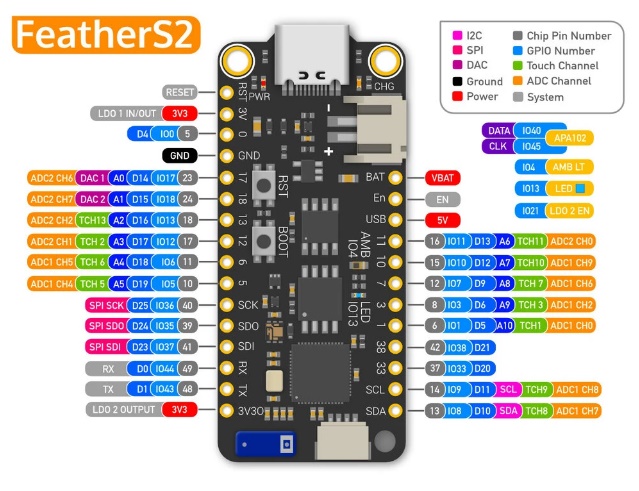
#define  SPI_MISO       37
#define  SPI_MOSI       35
#define  SPI_SCK        36
SPIClass SPI2(HSPI);
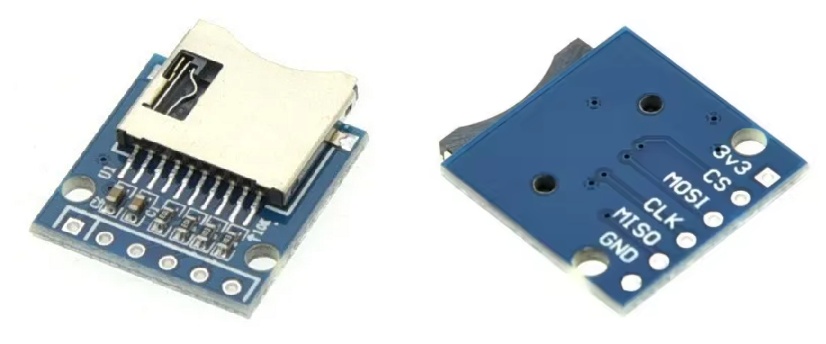
#define  SPI2_CS       11
#define  SPI2_MOSI     10
#define  SPI2_SCK       7
#define  SPI2_MISO      3
#define  SDSPEED   40000000

#define MP3_DREQ  17
#define MP3_XCS   18
#define MP3_XDCS  12
#define MP3_RESET 14

//VS10xx SCI Registers
#define SCI_MODE 0x00
#define SCI_STATUS 0x01
#define SCI_BASS 0x02
#define SCI_CLOCKF 0x03
#define SCI_DECODE_TIME 0x04
#define SCI_AUDATA 0x05
#define SCI_WRAM 0x06
#define SCI_WRAMADDR 0x07
#define SCI_HDAT0 0x08
#define SCI_HDAT1 0x09
#define SCI_AIADDR 0x0A
#define SCI_VOL 0x0B
#define SCI_AICTRL0 0x0C
#define SCI_AICTRL1 0x0D
#define SCI_AICTRL2 0x0E
#define SCI_AICTRL3 0x0F

void setup()
{
  pinMode(MP3_DREQ,  INPUT);
  pinMode(MP3_XCS,   OUTPUT);
  pinMode(MP3_XDCS,  OUTPUT);
  pinMode(MP3_RESET, OUTPUT);

  Serial0.begin(115200); //Use serial for debugging
  Serial0.println("MP3 Testing");

  //Setup SPI for VS1053
  SPI.begin(SPI_SCK, SPI_MISO, SPI_MOSI, -1);
  SPI.setBitOrder(MSBFIRST);
  SPI.setDataMode(SPI_MODE0);

  //From page 12 of datasheet, max SCI reads are CLKI/7. Input clock is 12.288MHz.
  //Internal clock multiplier is 1.0x after power up.
  //Therefore, max SPI speed is 1.75MHz. We will use 1MHz to be safe.
  SPI.setClockDivider(SPI_CLOCK_DIV16); //Set SPI bus speed to 1MHz (16MHz / 16 = 1MHz)
  SPI.transfer(0xFF); //Throw a dummy byte at the bus

  //Initialize VS1053 chip
  digitalWrite(MP3_XCS,   HIGH); //Deselect Control
  digitalWrite(MP3_XDCS,  HIGH); //Deselect Data
  digitalWrite(MP3_RESET, LOW);  //Put VS1053 into hardware reset
  delay(10);
  digitalWrite(MP3_RESET, HIGH); //Bring up VS1053

  Mp3SetVolume(20, 20); //Set initial volume (20 = -10dB) LOUD
  //Mp3SetVolume(40, 40); //Set initial volume (20 = -10dB) Manageable
  //Mp3SetVolume(80, 80); //Set initial volume (20 = -10dB) More quiet

  //Let's check the status of the VS1053
  int MP3Mode   = Mp3ReadRegister(SCI_MODE);
  int MP3Status = Mp3ReadRegister(SCI_STATUS);
  int MP3Clock  = Mp3ReadRegister(SCI_CLOCKF);

  Serial0.print("SCI_Mode (0x4800) = 0x");
  Serial0.println(MP3Mode, HEX);

  Serial0.print("SCI_Status (0x48) = 0x");
  Serial0.println(MP3Status, HEX);

  Serial0.print("SCI_ClockF = 0x");
  Serial0.println(MP3Clock, HEX);

  int vsVersion = (MP3Status >> 4) & 0x000F; //Mask out only the four version bits
  Serial0.print("VS Version (VS1053 is 4) = ");
  Serial0.println(vsVersion, DEC); //The 1053B should respond with 4. VS1001 = 0, VS1011 = 1, VS1002 = 2, VS1003 = 3

  //Now that we have the VS1053 up and running, increase the internal clock multiplier and up our SPI rate
  Mp3WriteRegister(SCI_CLOCKF, 0x60, 0x00); //Set multiplier to 3.0x

  //From page 12 of datasheet, max SCI reads are CLKI/7. Input clock is 12.288MHz.
  //Internal clock multiplier is now 3x.
  //Therefore, max SPI speed is 5MHz. 4MHz will be safe.
  //SPI.setClockDivider(SPI_CLOCK_DIV4); //Set SPI bus speed to 4MHz (16MHz / 4 = 4MHz)
  SPI.setFrequency(4000000);

	SPI2.begin(SPI2_SCK, SPI2_MISO, SPI2_MOSI, -1);
	pinMode(SPI2_CS, OUTPUT);

	if (!SD.begin(SPI2_CS, SPI2, SDSPEED)) {
		Serial0.printf("initialization failed!\n");
		while(1);
	}
	Serial0.printf("initialization done.\n");

	playMP3("/sound/12_ARPEGGIO.mp3");
}

void loop() {}

void playMP3(char* fileName)
{
  uint8_t mp3DataBuffer[32]; //Buffer of 32 bytes. VS1053 can take 32 bytes at a go.

	Serial0.printf("trackName = %s\n",fileName);

	if (!SD.begin(SPI2_CS, SPI2, SDSPEED)) {
		Serial0.printf("initialization failed!\n");
		while(1);
	}

  if (!(file = SD.open(fileName))) {
		Serial0.printf("%s failed to open!\n", fileName);
    return;
  }

  Serial0.println("Track open");
  Serial0.println("Start MP3 decoding");

  while(1) {
    while(!digitalRead(MP3_DREQ));
    int readBytes = file.read(mp3DataBuffer, sizeof(mp3DataBuffer));
    if (readBytes<=0) break;
    digitalWrite(MP3_XDCS, LOW); //Select Data
    for(int y = 0 ; y < readBytes; y++) {
      while(!digitalRead(MP3_DREQ)); //If we ever see DREQ low, then we wait here
      SPI.transfer(mp3DataBuffer[y]); // Send SPI byte
    }
    digitalWrite(MP3_XDCS, HIGH); //Deselect Data
  }
  file.close(); //Close out this track

  //End of file - send 2048 zeros before next file
  digitalWrite(MP3_XDCS, LOW); //Select Data
  for (int i = 0 ; i < 2048 ; i++) {
    while(!digitalRead(MP3_DREQ)); //If we ever see DREQ low, then we wait here
    SPI.transfer(0);
  }
  while(!digitalRead(MP3_DREQ)) ; //Wait for DREQ to go high indicating transfer is complete
  digitalWrite(MP3_XDCS, HIGH); //Deselect Data
  Serial0.printf("Track %s done!\n", fileName);
}

//Write to VS10xx register
//SCI: Data transfers are always 16bit. When a new SCI operation comes in
//DREQ goes low. We then have to wait for DREQ to go high again.
//XCS should be low for the full duration of operation.
void Mp3WriteRegister(unsigned char addressbyte, unsigned char highbyte, unsigned char lowbyte){
  while(!digitalRead(MP3_DREQ)) ; //Wait for DREQ to go high indicating IC is available
  digitalWrite(MP3_XCS, LOW); //Select control

  //SCI consists of instruction byte, address byte, and 16-bit data word.
  SPI.transfer(0x02); //Write instruction
  SPI.transfer(addressbyte);
  SPI.transfer(highbyte);
  SPI.transfer(lowbyte);
  while(!digitalRead(MP3_DREQ)) ; //Wait for DREQ to go high indicating command is complete
  digitalWrite(MP3_XCS, HIGH); //Deselect Control
}

//Read the 16-bit value of a VS10xx register
unsigned int Mp3ReadRegister (unsigned char addressbyte){
  while(!digitalRead(MP3_DREQ)) ; //Wait for DREQ to go high indicating IC is available
  digitalWrite(MP3_XCS, LOW); //Select control

  //SCI consists of instruction byte, address byte, and 16-bit data word.
  SPI.transfer(0x03);  //Read instruction
  SPI.transfer(addressbyte);

  char response1 = SPI.transfer(0xFF); //Read the first byte
  while(!digitalRead(MP3_DREQ)) ; //Wait for DREQ to go high indicating command is complete
  char response2 = SPI.transfer(0xFF); //Read the second byte
  while(!digitalRead(MP3_DREQ)) ; //Wait for DREQ to go high indicating command is complete

  digitalWrite(MP3_XCS, HIGH); //Deselect Control

  int resultvalue = response1 << 8;
  resultvalue |= response2;
  return resultvalue;
}

//Set VS10xx Volume Register
void Mp3SetVolume(unsigned char leftchannel, unsigned char rightchannel){
  Mp3WriteRegister(SCI_VOL, leftchannel, rightchannel);
}
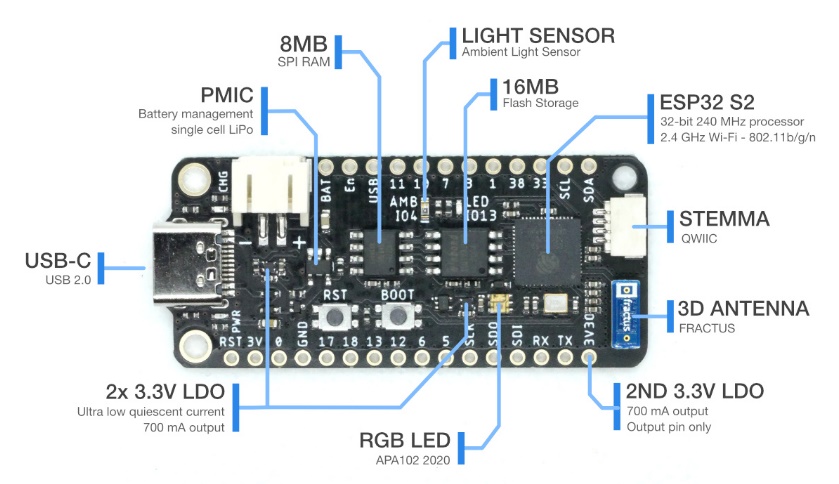
プログラムの書込みに失敗する場合は、FeatherS2をRaspberry Pi にUSB接続後に、[BOOT]を押しながら[RESET]をクリックして、デバイスをダウンロードモードにします







 Raspberry Pi(ラズベリー パイ)は、ARMプロセッサを搭載したシングルボードコンピュータ。イギリスのラズベリーパイ財団によって開発されている。