Adafruit Monochrome OLED
2025.10.11
●Adafruit 128x64 OLED FeatherWing
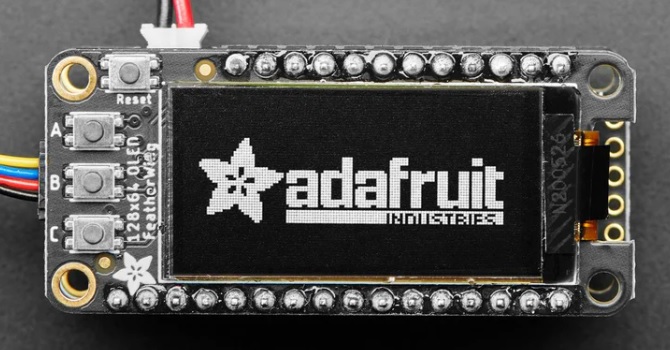
 Adafruit FeatherWing OLED
・128x64 monochrome OLED plus 3 user buttons
・SH1107 OLED driver
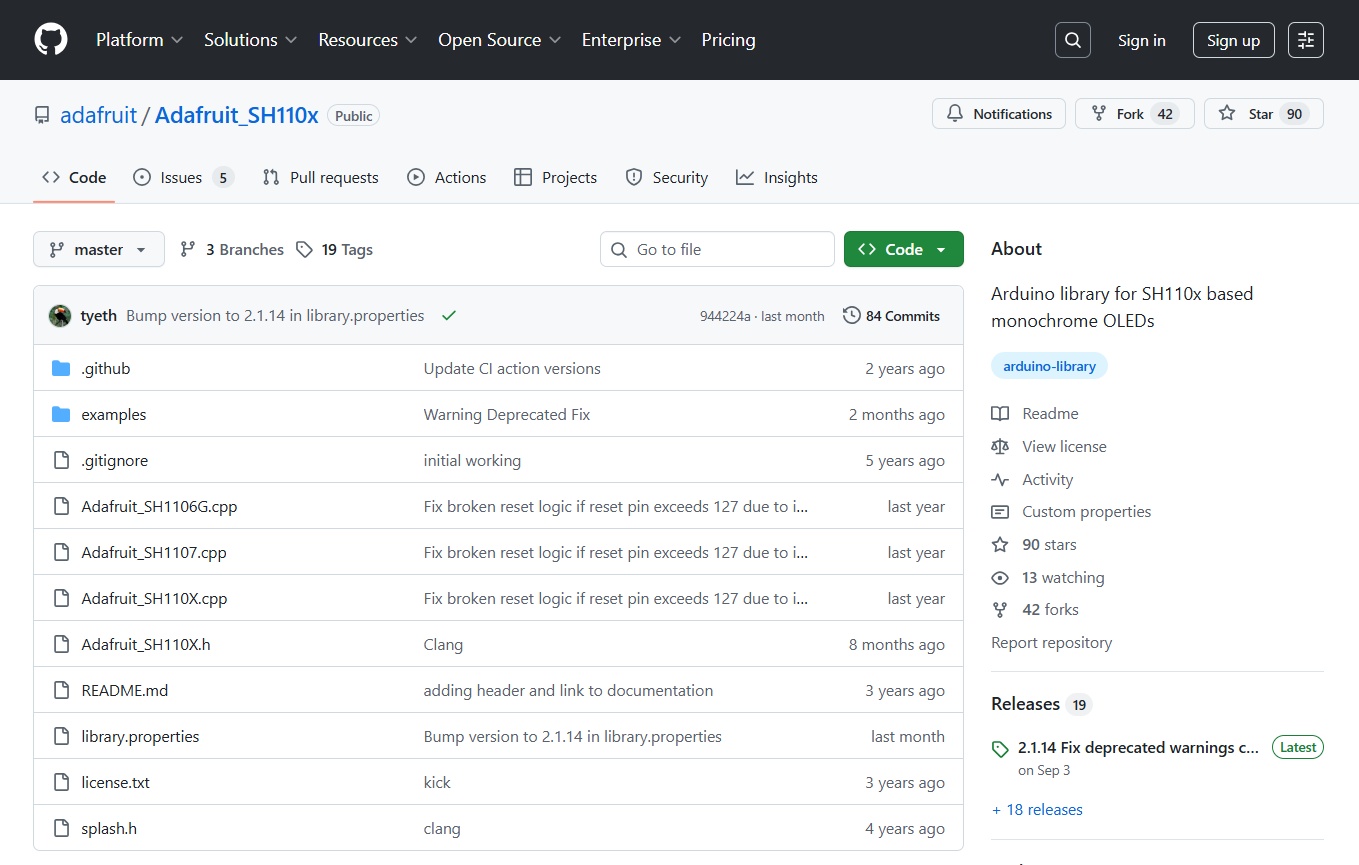
adafruit/Adafruit_SH110x
Adafruit SH110x Arduino Library
SH1107_128x64_i2c_QTPY.ino
#include <SPI.h>
#include <Wire.h>
#include <Adafruit_GFX.h>
#include <Adafruit_SH110X.h>

#define i2c_Address 0x3c //initialize with the I2C addr 0x3C Typically eBay OLED's

#define SCREEN_WIDTH   64  // OLED display width, in pixels
#define SCREEN_HEIGHT 128  // OLED display height, in pixels
#define OLED_RESET -1      //   QT-PY / XIAO

#if defined (ARDUINO_ADAFRUIT_QTPY_ESP32S2)
	Adafruit_SH1107 display = Adafruit_SH1107(SCREEN_WIDTH, SCREEN_HEIGHT, &Wire1, OLED_RESET);
#else
	Adafruit_SH1107 display = Adafruit_SH1107(SCREEN_WIDTH, SCREEN_HEIGHT, &Wire,  OLED_RESET);
#endif

#define NUMFLAKES 10
#define XPOS 0
#define YPOS 1
#define DELTAY 2

#define LOGO16_GLCD_HEIGHT 16
#define LOGO16_GLCD_WIDTH  16
static const unsigned char PROGMEM logo16_glcd_bmp[] =
{ B00000000, B11000000,
  B00000001, B11000000,
  B00000001, B11000000,
  B00000011, B11100000,
  B11110011, B11100000,
  B11111110, B11111000,
  B01111110, B11111111,
  B00110011, B10011111,
  B00011111, B11111100,
  B00001101, B01110000,
  B00011011, B10100000,
  B00111111, B11100000,
  B00111111, B11110000,
  B01111100, B11110000,
  B01110000, B01110000,
  B00000000, B00110000
};

void setup()   {

  Serial1.begin(115200);
	Serial1.println("128x64 OLED FeatherWing test");
  // Show image buffer on the display hardware.
  // Since the buffer is intialized with an Adafruit splashscreen
  // internally, this will display the splashscreen.

  delay(250); // wait for the OLED to power up
  display.begin(i2c_Address, true); // Address 0x3C default
 //display.setContrast (0); // dim display

  // Clear the buffer.
  display.setRotation(0);
  display.clearDisplay();

  // draw a single pixel
  display.drawPixel(10, 10, SH110X_WHITE);
  // Show the display buffer on the hardware.
  // NOTE: You _must_ call display after making any drawing commands
  // to make them visible on the display hardware!
  display.display();
  delay(2000);
  display.clearDisplay();

  // draw many lines
  testdrawline();
  display.display();
  delay(2000);
  display.clearDisplay();

  // draw rectangles
  testdrawrect();
  display.display();
  delay(2000);
  display.clearDisplay();

  // draw multiple rectangles
  testfillrect();
  display.display();
  delay(2000);
  display.clearDisplay();

  // draw mulitple circles
  testdrawcircle();
  display.display();
  delay(2000);
  display.clearDisplay();

  // draw a SH110X_WHITE circle, 10 pixel radius
  display.fillCircle(display.width() / 2, display.height() / 2, 10, SH110X_WHITE);
  display.display();
  delay(2000);
  display.clearDisplay();

  testdrawroundrect();
  delay(2000);
  display.clearDisplay();

  testfillroundrect();
  delay(2000);
  display.clearDisplay();

  testdrawtriangle();
  delay(2000);
  display.clearDisplay();

  testfilltriangle();
  delay(2000);
  display.clearDisplay();

  // draw the first ~12 characters in the font
  testdrawchar();
  display.display();
  delay(2000);
  display.clearDisplay();

  // text display tests
  display.setTextSize(1);
  display.setTextColor(SH110X_WHITE);
  display.setCursor(0, 0);
  display.println("Failure is always an option");
  display.setTextColor(SH110X_BLACK, SH110X_WHITE); // 'inverted' text
  display.println(3.141592);
  display.setTextSize(2);
  display.setTextColor(SH110X_WHITE);
  display.print("0x"); display.println(0xDEADBEEF, HEX);
  display.display();
  delay(2000);
  display.clearDisplay();

  // miniature bitmap display
  display.drawBitmap(30, 16,  logo16_glcd_bmp, 16, 16, 1);
  display.display();
  delay(1);

  // invert the display
  display.invertDisplay(true);
  delay(1000);
  display.invertDisplay(false);
  delay(1000);
  display.clearDisplay();

  // draw a bitmap icon and 'animate' movement
  testdrawbitmap(logo16_glcd_bmp, LOGO16_GLCD_HEIGHT, LOGO16_GLCD_WIDTH);
}

void loop() {}

void testdrawbitmap(const uint8_t *bitmap, uint8_t w, uint8_t h) {
  uint8_t icons[NUMFLAKES][3];

  // initialize
  for (uint8_t f = 0; f < NUMFLAKES; f++) {
    icons[f][XPOS] = random(display.width());
    icons[f][YPOS] = 0;
    icons[f][DELTAY] = random(5) + 1;
    Serial1.printf("x: %d y: %d dy: %d\n", icons[f][XPOS],icons[f][YPOS],icons[f][DELTAY]);
  }

  while (1) {
    // draw each icon
    for (uint8_t f = 0; f < NUMFLAKES; f++) {
      display.drawBitmap(icons[f][XPOS], icons[f][YPOS], bitmap, w, h, SH110X_WHITE);
    }
    display.display();
    delay(200);

    // then erase it + move it
    for (uint8_t f = 0; f < NUMFLAKES; f++) {
      display.drawBitmap(icons[f][XPOS], icons[f][YPOS], bitmap, w, h, SH110X_BLACK);
      // move it
      icons[f][YPOS] += icons[f][DELTAY];
      // if its gone, reinit
      if (icons[f][YPOS] > display.height()) {
        icons[f][XPOS] = random(display.width());
        icons[f][YPOS] = 0;
        icons[f][DELTAY] = random(5) + 1;
      }
    }
  }
}


void testdrawchar(void) {
  display.setTextSize(1);
  display.setTextColor(SH110X_WHITE);
  display.setCursor(0, 0);

  for (uint8_t i = 0; i < 168; i++) {
    if (i == '\n') continue;
    display.write(i);
    if ((i > 0) && (i % 21 == 0))
      display.println();
  }
  display.display();
  delay(1);
}

void testdrawcircle(void) {
  for (int16_t i = 0; i < display.height(); i += 2) {
    display.drawCircle(display.width() / 2, display.height() / 2, i, SH110X_WHITE);
    display.display();
    delay(1);
  }
}

void testfillrect(void) {
  uint8_t color = 1;
  for (int16_t i = 0; i < display.height() / 2; i += 3) {
    // alternate colors
    display.fillRect(i, i, display.width() - i * 2, display.height() - i * 2, color % 2);
    display.display();
    delay(1);
    color++;
  }
}

void testdrawtriangle(void) {
  for (int16_t i = 0; i < min(display.width(), display.height()) / 2; i += 5) {
    display.drawTriangle(display.width() / 2, display.height() / 2 - i,
                         display.width() / 2 - i, display.height() / 2 + i,
                         display.width() / 2 + i, display.height() / 2 + i, SH110X_WHITE);
    display.display();
    delay(1);
  }
}

void testfilltriangle(void) {
  uint8_t color = SH110X_WHITE;
  for (int16_t i = min(display.width(), display.height()) / 2; i > 0; i -= 5) {
    display.fillTriangle(display.width() / 2, display.height() / 2 - i,
                         display.width() / 2 - i, display.height() / 2 + i,
                         display.width() / 2 + i, display.height() / 2 + i, SH110X_WHITE);
    if (color == SH110X_WHITE) color = SH110X_BLACK;
    else color = SH110X_WHITE;
    display.display();
    delay(1);
  }
}

void testdrawroundrect(void) {
  for (int16_t i = 0; i < display.height() / 2 - 2; i += 2) {
    display.drawRoundRect(i, i, display.width() - 2 * i, display.height() - 2 * i, display.height() / 4, SH110X_WHITE);
    display.display();
    delay(1);
  }
}

void testfillroundrect(void) {
  uint8_t color = SH110X_WHITE;
  for (int16_t i = 0; i < display.height() / 2 - 2; i += 2) {
    display.fillRoundRect(i, i, display.width() - 2 * i, display.height() - 2 * i, display.height() / 4, color);
    if (color == SH110X_WHITE) color = SH110X_BLACK;
    else color = SH110X_WHITE;
    display.display();
    delay(1);
  }
}

void testdrawrect(void) {
  for (int16_t i = 0; i < display.height() / 2; i += 2) {
    display.drawRect(i, i, display.width() - 2 * i, display.height() - 2 * i, SH110X_WHITE);
    display.display();
    delay(1);
  }
}

void testdrawline() {
  for (int16_t i = 0; i < display.width(); i += 4) {
    display.drawLine(0, 0, i, display.height() - 1, SH110X_WHITE);
    display.display();
    delay(1);
  }
  for (int16_t i = 0; i < display.height(); i += 4) {
    display.drawLine(0, 0, display.width() - 1, i, SH110X_WHITE);
    display.display();
    delay(1);
  }
  delay(250);

  display.clearDisplay();
  for (int16_t i = 0; i < display.width(); i += 4) {
    display.drawLine(0, display.height() - 1, i, 0, SH110X_WHITE);
    display.display();
    delay(1);
  }
  for (int16_t i = display.height() - 1; i >= 0; i -= 4) {
    display.drawLine(0, display.height() - 1, display.width() - 1, i, SH110X_WHITE);
    display.display();
    delay(1);
  }
  delay(250);

  display.clearDisplay();
  for (int16_t i = display.width() - 1; i >= 0; i -= 4) {
    display.drawLine(display.width() - 1, display.height() - 1, i, 0, SH110X_WHITE);
    display.display();
    delay(1);
  }
  for (int16_t i = display.height() - 1; i >= 0; i -= 4) {
    display.drawLine(display.width() - 1, display.height() - 1, 0, i, SH110X_WHITE);
    display.display();
    delay(1);
  }
  delay(250);

  display.clearDisplay();
  for (int16_t i = 0; i < display.height(); i += 4) {
    display.drawLine(display.width() - 1, 0, 0, i, SH110X_WHITE);
    display.display();
    delay(1);
  }
  for (int16_t i = 0; i < display.width(); i += 4) {
    display.drawLine(display.width() - 1, 0, i, display.height() - 1, SH110X_WHITE);
    display.display();
    delay(1);
  }
  delay(250);
}
$ pio run -e adafruit_qtpy_esp32s2 -t upload
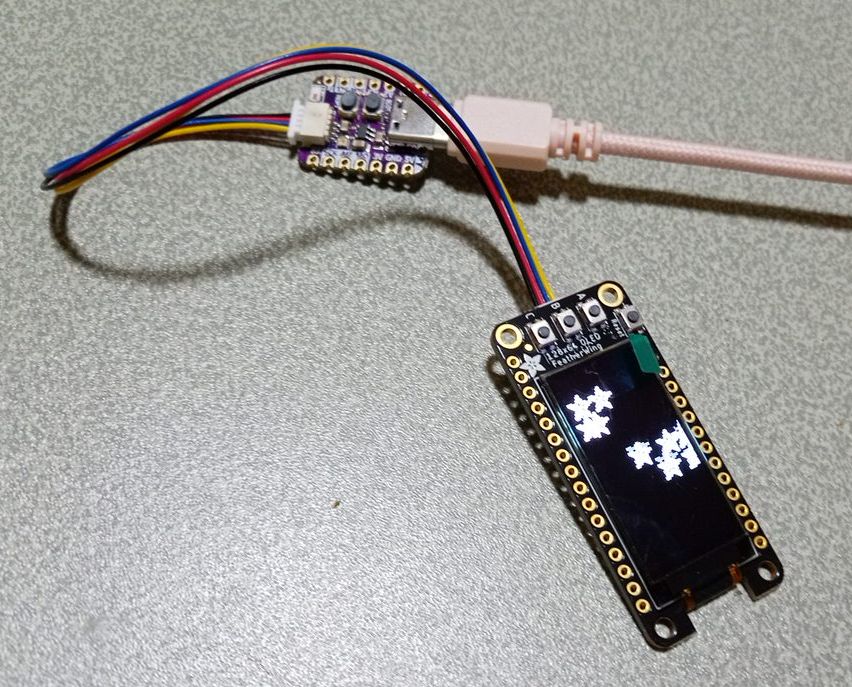
SH1107_128x64_i2c_Button.ino
#include <SPI.h>
#include <Wire.h>
#include <Adafruit_GFX.h>
#include <Adafruit_SH110X.h>

Adafruit_SH1107 display = Adafruit_SH1107(64, 128, &Wire);

// OLED FeatherWing buttons map to different pins depending on board:
#if defined(ESP8266)
  #define BUTTON_A  0
  #define BUTTON_B 16
  #define BUTTON_C  2
#elif defined(ESP32) && \
    !defined(ARDUINO_ADAFRUIT_FEATHER_ESP32S2) && \
    !defined(ARDUINO_ADAFRUIT_FEATHER_ESP32S3) && \
    !defined(ARDUINO_ADAFRUIT_FEATHER_ESP32S3_NOPSRAM)
  #define BUTTON_A 15
  #define BUTTON_B 32
  #define BUTTON_C 14
#elif defined(ARDUINO_STM32_FEATHER)
  #define BUTTON_A PA15
  #define BUTTON_B PC7
  #define BUTTON_C PC5
#elif defined(TEENSYDUINO)
  #define BUTTON_A  4
  #define BUTTON_B  3
  #define BUTTON_C  8
#elif defined(ARDUINO_NRF52832_FEATHER)
  #define BUTTON_A 31
  #define BUTTON_B 30
  #define BUTTON_C 27
#else // 32u4, M0, M4, nrf52840, esp32-s2, esp32-s3 and 328p
  #define BUTTON_A  9
  #define BUTTON_B  6
  #define BUTTON_C  5
#endif

void setup() {
  Serial.begin(115200);

  Serial.println("128x64 OLED FeatherWing test");
  delay(250); // wait for the OLED to power up
  display.begin(0x3C, true); // Address 0x3C default

  Serial.println("OLED begun");

  // Show image buffer on the display hardware.
  // Since the buffer is intialized with an Adafruit splashscreen
  // internally, this will display the splashscreen.
  display.display();
  delay(1000);

  // Clear the buffer.
  display.clearDisplay();
  display.display();

  display.setRotation(1);
  Serial.println("Button test");

  pinMode(BUTTON_A, INPUT_PULLUP);
  pinMode(BUTTON_B, INPUT_PULLUP);
  pinMode(BUTTON_C, INPUT_PULLUP);

  // text display tests
  display.setTextSize(1);
  display.setTextColor(SH110X_WHITE);
  display.setCursor(0,0);
  display.print("Connecting to SSID\n'adafruit':");
  display.print("connected!");
  display.println("IP: 10.0.1.23");
  display.println("Sending val #0");
  display.display(); // actually display all of the above
}

void loop() {
  if(!digitalRead(BUTTON_A)) display.print("A");
  if(!digitalRead(BUTTON_B)) display.print("B");
  if(!digitalRead(BUTTON_C)) display.print("C");
  delay(10);
  yield();
  display.display();
}
●Monochrome 0.91" 128x32 I2C OLED Display - STEMMA QT / Qwiic
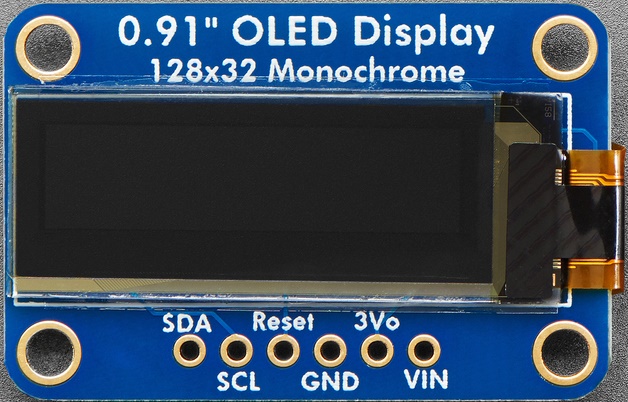
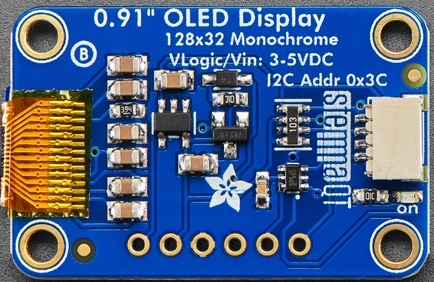
Product ID: 4440
・128x32 individual white OLED pixels
・the display uses about 20mA from the 3.3V supply
・3.3V (Feather/Raspberry Pi) or 5V (Arduino/ Metro328) logic levels
・I2C 7-bit address 0x3C
adafruit/Adafruit_SSD1306
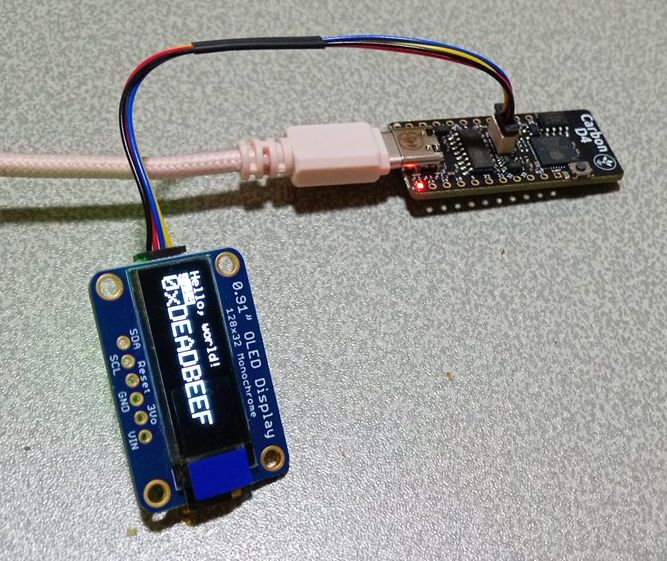
ssd1306_128x32_i2c.ino
#include <SPI.h>
#include <Wire.h>
#include <Adafruit_GFX.h>
#include <Adafruit_SSD1306.h>

#define SCREEN_WIDTH 128 // OLED display width, in pixels
#define SCREEN_HEIGHT 32 // OLED display height, in pixels

#define OLED_RESET     -1 // Reset pin # (or -1 if sharing Arduino reset pin)
#define SCREEN_ADDRESS 0x3C ///< See datasheet for Address; 0x3D for 128x64, 0x3C for 128x32
Adafruit_SSD1306 display(SCREEN_WIDTH, SCREEN_HEIGHT, &Wire, OLED_RESET);

#define NUMFLAKES     10 // Number of snowflakes in the animation example

#define LOGO_HEIGHT   16
#define LOGO_WIDTH    16
static const unsigned char PROGMEM logo_bmp[] =
{ 0b00000000, 0b11000000,
  0b00000001, 0b11000000,
  0b00000001, 0b11000000,
  0b00000011, 0b11100000,
  0b11110011, 0b11100000,
  0b11111110, 0b11111000,
  0b01111110, 0b11111111,
  0b00110011, 0b10011111,
  0b00011111, 0b11111100,
  0b00001101, 0b01110000,
  0b00011011, 0b10100000,
  0b00111111, 0b11100000,
  0b00111111, 0b11110000,
  0b01111100, 0b11110000,
  0b01110000, 0b01110000,
  0b00000000, 0b00110000 };

void setup() {
  Serial.begin(9600);

  // SSD1306_SWITCHCAPVCC = generate display voltage from 3.3V internally
  if(!display.begin(SSD1306_SWITCHCAPVCC, SCREEN_ADDRESS)) {
    Serial.println(F("SSD1306 allocation failed"));
    for(;;); // Don't proceed, loop forever
  }

  // Show initial display buffer contents on the screen --
  // the library initializes this with an Adafruit splash screen.
  display.display();
  delay(2000); // Pause for 2 seconds

  // Clear the buffer
  display.clearDisplay();

  // Draw a single pixel in white
  display.drawPixel(10, 10, SSD1306_WHITE);

  // Show the display buffer on the screen. You MUST call display() after
  // drawing commands to make them visible on screen!
  display.display();
  delay(2000);
  // display.display() is NOT necessary after every single drawing command,
  // unless that's what you want...rather, you can batch up a bunch of
  // drawing operations and then update the screen all at once by calling
  // display.display(). These examples demonstrate both approaches...

  testdrawline();      // Draw many lines

  testdrawrect();      // Draw rectangles (outlines)

  testfillrect();      // Draw rectangles (filled)

  testdrawcircle();    // Draw circles (outlines)

  testfillcircle();    // Draw circles (filled)

  testdrawroundrect(); // Draw rounded rectangles (outlines)

  testfillroundrect(); // Draw rounded rectangles (filled)

  testdrawtriangle();  // Draw triangles (outlines)

  testfilltriangle();  // Draw triangles (filled)

  testdrawchar();      // Draw characters of the default font

  testdrawstyles();    // Draw 'stylized' characters

  testscrolltext();    // Draw scrolling text

  testdrawbitmap();    // Draw a small bitmap image

  // Invert and restore display, pausing in-between
  display.invertDisplay(true);
  delay(1000);
  display.invertDisplay(false);
  delay(1000);

  testanimate(logo_bmp, LOGO_WIDTH, LOGO_HEIGHT); // Animate bitmaps
}

void loop() {
}

void testdrawline() {
  int16_t i;

  display.clearDisplay(); // Clear display buffer

  for(i=0; i<display.width(); i+=4) {
    display.drawLine(0, 0, i, display.height()-1, SSD1306_WHITE);
    display.display(); // Update screen with each newly-drawn line
    delay(1);
  }
  for(i=0; i<display.height(); i+=4) {
    display.drawLine(0, 0, display.width()-1, i, SSD1306_WHITE);
    display.display();
    delay(1);
  }
  delay(250);

  display.clearDisplay();

  for(i=0; i<display.width(); i+=4) {
    display.drawLine(0, display.height()-1, i, 0, SSD1306_WHITE);
    display.display();
    delay(1);
  }
  for(i=display.height()-1; i>=0; i-=4) {
    display.drawLine(0, display.height()-1, display.width()-1, i, SSD1306_WHITE);
    display.display();
    delay(1);
  }
  delay(250);

  display.clearDisplay();

  for(i=display.width()-1; i>=0; i-=4) {
    display.drawLine(display.width()-1, display.height()-1, i, 0, SSD1306_WHITE);
    display.display();
    delay(1);
  }
  for(i=display.height()-1; i>=0; i-=4) {
    display.drawLine(display.width()-1, display.height()-1, 0, i, SSD1306_WHITE);
    display.display();
    delay(1);
  }
  delay(250);

  display.clearDisplay();

  for(i=0; i<display.height(); i+=4) {
    display.drawLine(display.width()-1, 0, 0, i, SSD1306_WHITE);
    display.display();
    delay(1);
  }
  for(i=0; i<display.width(); i+=4) {
    display.drawLine(display.width()-1, 0, i, display.height()-1, SSD1306_WHITE);
    display.display();
    delay(1);
  }

  delay(2000); // Pause for 2 seconds
}

void testdrawrect(void) {
  display.clearDisplay();

  for(int16_t i=0; i<display.height()/2; i+=2) {
    display.drawRect(i, i, display.width()-2*i, display.height()-2*i, SSD1306_WHITE);
    display.display(); // Update screen with each newly-drawn rectangle
    delay(1);
  }

  delay(2000);
}

void testfillrect(void) {
  display.clearDisplay();

  for(int16_t i=0; i<display.height()/2; i+=3) {
    // The INVERSE color is used so rectangles alternate white/black
    display.fillRect(i, i, display.width()-i*2, display.height()-i*2, SSD1306_INVERSE);
    display.display(); // Update screen with each newly-drawn rectangle
    delay(1);
  }

  delay(2000);
}

void testdrawcircle(void) {
  display.clearDisplay();

  for(int16_t i=0; i<max(display.width(),display.height())/2; i+=2) {
    display.drawCircle(display.width()/2, display.height()/2, i, SSD1306_WHITE);
    display.display();
    delay(1);
  }

  delay(2000);
}

void testfillcircle(void) {
  display.clearDisplay();

  for(int16_t i=max(display.width(),display.height())/2; i>0; i-=3) {
    // The INVERSE color is used so circles alternate white/black
    display.fillCircle(display.width() / 2, display.height() / 2, i, SSD1306_INVERSE);
    display.display(); // Update screen with each newly-drawn circle
    delay(1);
  }

  delay(2000);
}

void testdrawroundrect(void) {
  display.clearDisplay();

  for(int16_t i=0; i<display.height()/2-2; i+=2) {
    display.drawRoundRect(i, i, display.width()-2*i, display.height()-2*i,
      display.height()/4, SSD1306_WHITE);
    display.display();
    delay(1);
  }

  delay(2000);
}

void testfillroundrect(void) {
  display.clearDisplay();

  for(int16_t i=0; i<display.height()/2-2; i+=2) {
    // The INVERSE color is used so round-rects alternate white/black
    display.fillRoundRect(i, i, display.width()-2*i, display.height()-2*i,
      display.height()/4, SSD1306_INVERSE);
    display.display();
    delay(1);
  }

  delay(2000);
}

void testdrawtriangle(void) {
  display.clearDisplay();

  for(int16_t i=0; i<max(display.width(),display.height())/2; i+=5) {
    display.drawTriangle(
      display.width()/2  , display.height()/2-i,
      display.width()/2-i, display.height()/2+i,
      display.width()/2+i, display.height()/2+i, SSD1306_WHITE);
    display.display();
    delay(1);
  }

  delay(2000);
}

void testfilltriangle(void) {
  display.clearDisplay();

  for(int16_t i=max(display.width(),display.height())/2; i>0; i-=5) {
    // The INVERSE color is used so triangles alternate white/black
    display.fillTriangle(
      display.width()/2  , display.height()/2-i,
      display.width()/2-i, display.height()/2+i,
      display.width()/2+i, display.height()/2+i, SSD1306_INVERSE);
    display.display();
    delay(1);
  }

  delay(2000);
}

void testdrawchar(void) {
  display.clearDisplay();

  display.setTextSize(1);      // Normal 1:1 pixel scale
  display.setTextColor(SSD1306_WHITE); // Draw white text
  display.setCursor(0, 0);     // Start at top-left corner
  display.cp437(true);         // Use full 256 char 'Code Page 437' font

  // Not all the characters will fit on the display. This is normal.
  // Library will draw what it can and the rest will be clipped.
  for(int16_t i=0; i<256; i++) {
    if(i == '\n') display.write(' ');
    else          display.write(i);
  }

  display.display();
  delay(2000);
}

void testdrawstyles(void) {
  display.clearDisplay();

  display.setTextSize(1);             // Normal 1:1 pixel scale
  display.setTextColor(SSD1306_WHITE);        // Draw white text
  display.setCursor(0,0);             // Start at top-left corner
  display.println(F("Hello, world!"));

  display.setTextColor(SSD1306_BLACK, SSD1306_WHITE); // Draw 'inverse' text
  display.println(3.141592);

  display.setTextSize(2);             // Draw 2X-scale text
  display.setTextColor(SSD1306_WHITE);
  display.print(F("0x")); display.println(0xDEADBEEF, HEX);

  display.display();
  delay(2000);
}

void testscrolltext(void) {
  display.clearDisplay();

  display.setTextSize(2); // Draw 2X-scale text
  display.setTextColor(SSD1306_WHITE);
  display.setCursor(10, 0);
  display.println(F("scroll"));
  display.display();      // Show initial text
  delay(100);

  // Scroll in various directions, pausing in-between:
  display.startscrollright(0x00, 0x0F);
  delay(2000);
  display.stopscroll();
  delay(1000);
  display.startscrollleft(0x00, 0x0F);
  delay(2000);
  display.stopscroll();
  delay(1000);
  display.startscrolldiagright(0x00, 0x07);
  delay(2000);
  display.startscrolldiagleft(0x00, 0x07);
  delay(2000);
  display.stopscroll();
  delay(1000);
}

void testdrawbitmap(void) {
  display.clearDisplay();

  display.drawBitmap(
    (display.width()  - LOGO_WIDTH ) / 2,
    (display.height() - LOGO_HEIGHT) / 2,
    logo_bmp, LOGO_WIDTH, LOGO_HEIGHT, 1);
  display.display();
  delay(1000);
}

#define XPOS   0 // Indexes into the 'icons' array in function below
#define YPOS   1
#define DELTAY 2

void testanimate(const uint8_t *bitmap, uint8_t w, uint8_t h) {
  int8_t f, icons[NUMFLAKES][3];

  // Initialize 'snowflake' positions
  for(f=0; f< NUMFLAKES; f++) {
    icons[f][XPOS]   = random(1 - LOGO_WIDTH, display.width());
    icons[f][YPOS]   = -LOGO_HEIGHT;
    icons[f][DELTAY] = random(1, 6);
    Serial.print(F("x: "));
    Serial.print(icons[f][XPOS], DEC);
    Serial.print(F(" y: "));
    Serial.print(icons[f][YPOS], DEC);
    Serial.print(F(" dy: "));
    Serial.println(icons[f][DELTAY], DEC);
  }

  for(;;) { // Loop forever...
    display.clearDisplay(); // Clear the display buffer

    // Draw each snowflake:
    for(f=0; f< NUMFLAKES; f++) {
      display.drawBitmap(icons[f][XPOS], icons[f][YPOS], bitmap, w, h, SSD1306_WHITE);
    }

    display.display(); // Show the display buffer on the screen
    delay(200);        // Pause for 1/10 second

    // Then update coordinates of each flake...
    for(f=0; f< NUMFLAKES; f++) {
      icons[f][YPOS] += icons[f][DELTAY];
      // If snowflake is off the bottom of the screen...
      if (icons[f][YPOS] >= display.height()) {
        // Reinitialize to a random position, just off the top
        icons[f][XPOS]   = random(1 - LOGO_WIDTH, display.width());
        icons[f][YPOS]   = -LOGO_HEIGHT;
        icons[f][DELTAY] = random(1, 6);
      }
    }
  }
}
$ pio run -e az-delivery-devkit-v4 -t upload
|
 Raspberry Pi(ラズベリー パイ)は、ARMプロセッサを搭載したシングルボードコンピュータ。イギリスのラズベリーパイ財団によって開発されている。
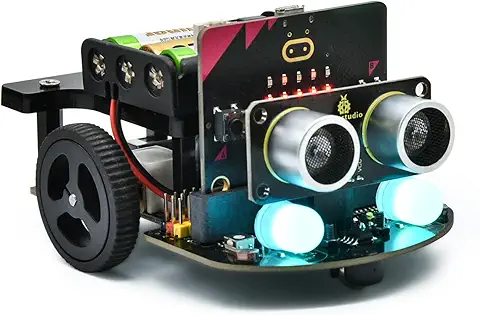 KEYESTUDIO Micro:bit V2ロボットスターターキット (マイクロビットなし) MakecodeとPython用
動き、光と音の使い方、障害物の検知と回避方法、線をたどり、IRリモコンとアプリでコントロールする方法を学びます。
 Maqueen Lite V5 micro:bit ロボットキット STEM用(ライントレース&障害物回避)
Maqueen Lite V5 STEMロボットは、事前調整済みのライントレースアルゴリズム、耐衝撃モーター、開封即使用可能な設計で、ストレスを解消します。
 たいていのことは100日あれば、うまくいく。長田英知著
「時間がなくて、なかなか自分のやりたいことができない」
「一念発起して何かを始めても、いつも三日坊主で終わってしまう」
「色んなことを先延ばしにしたまま、時間だけが過ぎていく」
そこで本書では、そんな著者が独自に開発した、
まったく新しい目標達成メソッド「100日デザイン」について、
その知識と技術を、余すところなくご紹介します。
 まんがで納得ナポレオン・ヒル 思考は現実化する
OLとして雑務をこなす日々に飽き足らず、科学者だった父が残した薬品を商品化すべく、起業を決意した内山麻由(27)。彼女はセミナーで知り合った謎の女性からサポートを得ながら、彼女と二人三脚でナポレオン・ヒルの成功哲学を実践し、さまざまな問題を乗り越えていく。
ヒル博士の<ゴールデンルール>に従い、仕事に、恋に全力疾走する彼女の、成功への物語。
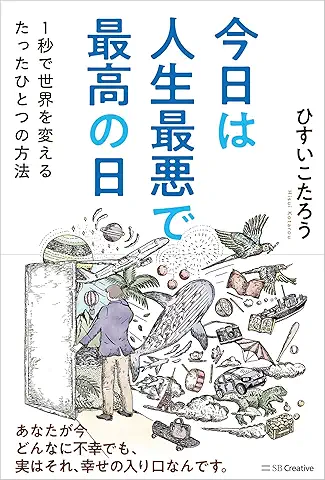 今日は人生最悪で最高の日 1秒で世界を変えるたったひとつの方法 ひすいこたろう著
偉人の伝記を読むと、最悪な日は、不幸な日ではなく、新しい自分が始まる日であることがわかります。最悪な出来事は、自分の人生が、想像を超えて面白くなる兆しなのです。偉人伝を読むことで、このときの不幸があったおかげで、未来にこういう幸せがくるのかと、人生を俯瞰する視線が立ち上がるのです。
 ご飯は私を裏切らない heisoku著
辛い現実から目を背けて食べるご飯は、いつも美味しく幸せを届けてくれる。
29歳、中卒、恋人いない歴イコール年齢。バイト以外の職歴もなく、短期バイトを転々とする日々。ぐるぐると思索に耽るけど、ご飯を食べると幸せになれる。奇才の新鋭・heisokuが贈るリアル労働グルメ物語!
 【最新版Gemini 3に対応!】できるGemini (できるシリーズ)
Geminiを「最強の知的生産パートナー」として使いこなすための、実践的なノウハウを凝縮した一冊です。
基本的な操作方法から、具体的なビジネスシーンでの活用、日々の業務を自動化するGoogle Workspaceとの連携、さらには自分だけのオリジナルAIを作成する方法まで余すところなく解説します。
 Rustプログラミング完全ガイド 他言語との比較で違いが分かる!
Rustの各手法や考え方を幅広く解説!
500以上のサンプルを掲載。実行結果も確認。
全24章の包括的なチュートリアル。
 ポチらせる文章術
販売サイト・ネット広告・メルマガ・ブログ・ホームページ・SNS…
全WEB媒体で効果バツグン!
カリスマコピーライターが教える「見てもらう」「買ってもらう」「共感してもらう」すべてに効くネット文章術
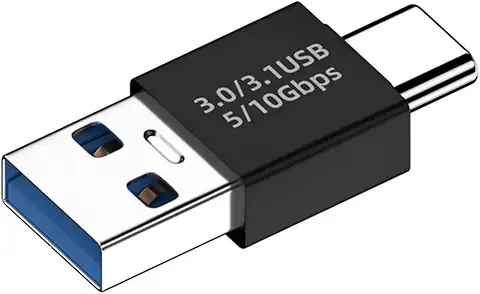 小型で便利な Type-C アダプター USB C オス - USB3.1 オスアダプター
Type-C端子のマイコンボードをこのアダプタを介して直接Raspberry Piに挿すことができます。ケーブルなしで便利なツールです。
 Divoom Ditoo Pro ワイヤレススピーカー
15W高音質重低音/青軸キーボード/Bluetooth5.3/ピクセルアート 専用アプリ/USB接続/microSDカード
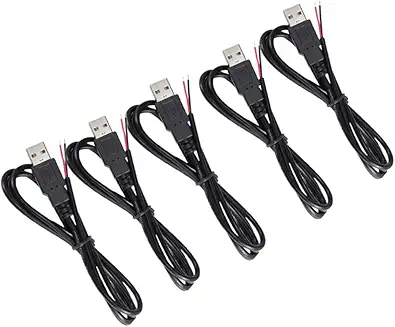 電源供給USBケーブル スリム 【5本セット】
USB電源ケーブル 5V DC電源供給ケーブル スリム 【5本セット】 電源供給 バッテリー 修理 自作 DIY 電子工作 (100cm)
|